Want to know how to design a logo like a professional and have all the resources you need in just one post? Then this is the post for you… Learn professional logo design in just 5 steps!
If you are after a professional logo design I am currently available for hire. Click here for a free quote.
1. Learn What A Logo Is & What It Represents

Before you design a logo, you must understand what a logo is, what it represents and what it is supposed to do. A logo is not just a mark – a logo reflects a business’s commercial brand via the use of shape, fonts, colour, and / or images.
A logo is for inspiring trust, recognition and admiration for a company or product and it is our job as designers to create a logo that will do its job.
One must know what a logo is before continuing.
For further reading on what is a logo check out Wikipedia’s Definition.
2. Know The Principles of Effective Logo Design
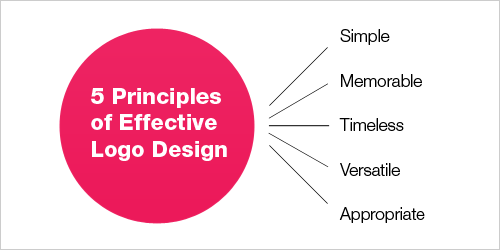
Now that you know what a logo is supposed to do, and what it should represent you now must learn about what makes a great logo aka; the basic rules and principles of effective logo design.
1. A logo must be simple
A simple logo design allows for easy recognition and allows the logo to be versatile & memorable. Good logos feature something unexpected or unique without being overdrawn.
2. A logo must be memorable
Following closely behind the principle of simplicity, is that of memorability. An effective logo design should be memorable and this is achieved by having a simple, yet, appropriate logo.
3. A logo must be timeless
An effective logo should be timeless – that is, it will stand the test of time. Will the logo still be effective in 10, 20, 50 years?
4. A logo must be versatile
An effective logo should be able to work across a variety of mediums and applications. For this reason a logo should be designed in vector format, to ensure that it can be scaled to any size. The logo must work in just one colour too.
5. A logo must be appropriate
How you position the logo should be appropriate for its intended purpose. For example, if you are designing a a logo for children’s toys store, it would be appropriate to use a childish font & color scheme. This would not be so appropriate for a law firm.
For further reading on the rules and principles of great logo design I highly recommend to read the logo design tips from Logo Factory before continuing and also the article Why logo design does not cost $5.00. You may also wish to read How NOT To Design A Logo.
3. Learn Off Others Success & Mistakes
Successful Logos
Now you know what the rules of logo design are, you can distinguish the difference between a good and a bad logo… By knowing what other logos have succeeded and why they have succeeded gives a great insight into what makes a good logo.
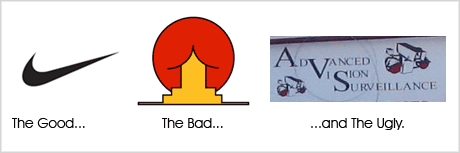
For example, lets look at the classic Nike Swoosh. This logo was created by Caroline Davidson in 1971 for only $35 yet it still a strong, memorable logo, effective without colour and easily scalable. It is simple, fluid and fast and represents the wing in the famous statue of the Greek Goddess of victory, Nike – something perfect for a sporting apparel business. Nike is just one of many great logos, think about other famous brands that you know about and check out their logos – what makes them successful?
Another great example would be Google’s logo simplification.
For more quality, lesser known logos I recommend checking out Logo Of The Day or going to your local book store or library and looking at a logo design book.
The Not So Successful Logos
We can also learn off logos that have not been as successful such as the ones in the above picture or these bad logo designs. As seen in that post linked, some logos can depict things that may have not always be noticeable to the designer (as in the middle logo above) or they could just be plain bad design, as in the logo to the right.
4. Establish Your Own Logo Design Process

Now that we know what a logo is, what the principles and rules of logo design are and what makes a successful logo we can now finally begin the design process. This it hardest part of the 5 steps and is its own topic in itself – Each person’s logo design process is different and experience usually is the key factor in creating your own logo design process however check out The Secret Logo Design Process Of Top Logo Designers for a better idea.
In short, a logo design process usually consists of
- The Design Brief
- Research & Brainstorming
- Sketching
- Prototyping & Conceptualising (See Step 5)
- Send To Client For Review
- Revise & Add Finishing Touches
- Supply Files To Client and Give Customer Service
If you ever get stuck before or during your design process check out this great article on How To Boost Your Creativity.
5. Learn The Software & Complete The Logo

After you have got your design process sorted out, it is usually a good time to begin mastering your software (Adobe Illustrator is the industry standard) but remember you can’t design a logo by just hopping straight onto the computer… brainstorm and sketch first.
After you have got your initial ideas and sketches from brainstorming you can then usually jump onto the computer to start digitising your logo. After you have got a great concept(s) digitised you can send it to your client, get revisions, and eventually complete the logo and thus, you have successfully created a professional logo.
Do you have any other tips or suggestions on how to make a professional logo?



That looks like a fun project to work on. Seeds for Wealth… I can already think of so many logo possibilities.
Seeds For Wealth…
Were you offering the Side Wide Link to Just Creative Design or as a prize in the draw? Thanks in advance for the exposure. 🙂
Minty Ferret,
Thanks for the blog post 🙂
Excellent post as I’m currently stuck designing my own logo. And I mean STUCK!
Seeds For Wealth’s last blog post..Free Vectors Of Money Sign Tags
Would you like to help work on it for fun? 🙂
Does a lifetime site wide link interest you? I’ll even throw in a review/exposure post because that looks like fun!
Seeds For Wealth’s last blog post..Free Vectors Of Money Sign Tags
Forgive me, I didn’t see the BIG project you have going on. Lots of prizes and things. I’ll end this “thread” and work through your group writing project. Thanks for commenting back!
Seeds For Wealth’s last blog post..Free Vectors Of Money Sign Tags
wow. thank for the tips.
Your welcome 🙂
Good tips and recommendations.
Good Post,
As a young designer i think there may be a few more things worth pointing out.
1> Stroke size, line weights and gradients should all be thoroughly checked in various scales and applications!
2> consider the logo’s future applications – print versions should ALWAYS be CMYK!
3> Small business letterhead logo’s often end up in “MS Word” templates most often printed in B+W (and yes, the fax machine still exists!), Contrast is the key.
4> Establish your ‘Clean space’… (a simple white box behind the final logo will normally do). Clean space is the negative space the designer defines around the logo to ensure no additions, backgrounds etc clash with the logo – research “logo style guides” for more info.
Hope that helps.
Hi Nathan,
They are some very good points as well, thank you for your additions especially for number 4. Something that does not get taught in graphic design school (well not mine anyway).
This is a great post. You have tried to put in much information in an organized way which really is wonderful.
Neat tips there. I’ve been able to sketch decent logos on paper, but somehow got too lazy after a few attempts in software. Those links should help – I’ll try that logo sketch again 🙂
Sumeshs last blog post..Compfight now sports a new design
LOL the one in the middle “the bad” looks like a trophy stuck up someone’s but!
Nice article.
I had given a small presentation on similar lines. You can view it here: http://netbramha.com/2008/04/23/designing-a-logo-few-things-to-keep-in-mind-before-starting/
Aashish Solankis last blog post..Death of a salesman @ RangaShankara
Tutorial 101 for anybody that wanna do this logo thing. Great U
Hi Kbhutto,
If you check out my featured articles page (link at top of page), you will find some similar articles.
Very good guide, especially for beginners. Logo is not something that anyone or any organization should design in one day. It required careful thoughts as it will represent companies image and overall approach.
I think you should most similar blog posts.
________________________
http://www.writingservicescompany.com
Except of the very nice and sophisticated info the link to the phallic logos flashed me totally 😀 Long ago I laughed so hard!
Thank you very much for this, I’m a beginner at logo design and I find this so helpful.
i am currently trying to start up my own business and this has been an awesome help for me. thank you so much.
🙂
omg nathan you are so right…
hahahhhahhaha
lmao
This is an interesting post. Thanks,
Conrad Gorny
Freelance Graphic Designer
http://www.conradgorny.com
“You can’t design a logo by just hopping straight onto the computer”
That is something a lot of my fellow students seemed to have difficulty getting their heads around. I used to think I was falling behind because I was always the last one to go into the computer room.
Great post!
Thank you for your comments and praise, glad to be of help.
Logo design is quite a bugger at times; especially if communication is slack between yourself the designer and your client; or if (like 100% of the time) your client is totally clueless to what they want!
This makes any form of design a ballache!
I think too many people try too hard with Fancy fonts (which are hard to read) pictures; “wordart” lol and other stupid techniques. I’ll hasten to admit I am no expert in it; however I do not think I do a bad job either, yet compared to most of the other designers (especially the value ones) I think I do a great job in comparison.
It does piss me off how people want a Logo for £100/$100 though; it really is the face of your company.
I WILL ADD; The UK, London Olympic logo is a pile of overpriced abstract shit; and just goes to show paying over the odds does not mean you will get a good design!
You’ve done a good job guy!
I think your investigation about logo world is really interesting!
I really like your “step”.
Thanks alot for that useful website wish you the best!!
This post is really helpfull, I’m learning on my own how to design and I think your post is cristalclear and easy to understand!
I like to contribute by linking this site that is similar to LogoPond, it can be usefull as inspiration also. http://faveup.com/
This are good tips, some of these I have been using to get some of my work done.
Hi Jacob, my name is Tavis Glover. I have been referring to your website for inspiration for a while now. Great Job! I am writing this comment because I am reaching out and looking for some help on how you were able to put a live blog with comments on your site. Any info, or articles, or anything would help. I have one up, but it is not like yours. Please help. Thanks again!
Hello Ipox,
I use WordPress as my blog system, which includes comments by defaults. Check out http://www.problogger.net for how to start blogging!
Hey what version of adobe would you recomend or even just what program would you recomend.
Adobe Illustrator is the way to go. The latest version is always recommended though the earlier versions will do the job too.
Thank you so much … you really gived a good tips,,,
Ugh, I can’t look at the nike logo without cringing. Not because it’s a bad design – it’s a good design. But the designer was only paid $35 and those Nike guys still laugh at it! The guys who did the Mobil oil logo got two million.
People need to do a little reasearch before they hit that post comment button…
Carolyn Davidson created the initial nike swoosh for $35 bucks..
BUT she also recieved….
“Nike co-founder and CEO Phil Knight gave Davidson a diamond ring with the swoosh on it and Nike stock in an amount that remains a secret! ”
and im sure the stock options she got given are worth a crap load more than $35
I think the point “logos cannot be designed for $5” works in any aspect of design.
Whenever I get someone who wants a “$5 logo”, I tell them, “Here’s $5. You have 5 minutes to make me a logo. Now, go!” They usually say, “I can’t do anything in 5 mins!” Neither can I….
Great post.
I’m looking to create a logo for a division of real estate. The already decided on name is “Team Heat Wave”. Heatwave can be one word or two. For a very small company is your company affordable to design an attractive logo.
Thank you for posting this article. =]
It’s very easy to understand, and especially helpful to me as I will be taking my graphics exam soon. Sometimes, instead of working, I spend hours reading your advice in lessons.
Keep up the good work. 😉
Great job dude ..this is a great post. You have tried to put in much information in an organized way which really is wonderful. thanks
As a person, who haven’t design a proper logo ever, I have pondered this one thought quite long: When one certain logo change to another? I mean, is it still a same logo for example if you have same sort of visual trick in it, thought the font or processing the visual outlook would change?
Empuska, Would you mind rephrasing the question… wasn’t exactly sure what you were asking?
Sorry, English isn’t my native language.
Google modifies their logo every holiday and various other days, when there have happened something and then Coca Cola had about 5 years ago some sort of campaing, where they had their coke bottles’ etiquettes written in languages, which didn’t used latin alphabets (in katakanas, cyrillic alphabets, arabic alphabets etc). Of course, these logos are so widly known that they are still recognized as same, but can there be design a logo which do have same visual trick produced over and over again, thought the mood and the style od logo were different? Would it be the same logo?
Great article! Thanks for this.
great post. i’m new to logo design and this is very informative!!
Hi ! i found this site very usefull and i think all its said about logo its true, its really foundation for every company. i just creating internet company project (my “webpage”) and i use logo of tatoo i hand – drawed about year ago. Altrough i found the original picture on the net, my logo is after all what i drawed by my hands. i think its “sit” with other instruction been descripted in other article here ( memorable, visible in inch size, etc). i beginning so what i like to ask is if its a good start or not cose i about sorting my logo to “real life” about now and i’d like to use in future one stadarized logo
byw email is [email protected] if anyone like to answer or get additional info on how to start cose i think i made well already
))
those are some real helpful tips…essential, as i have a final year campaign coming up soon
Thanx
Your tips are very helpful. Merci beaucoup!
LOL @ Advanced Vision Surveillance
They must’ve done that logo themselves.
hei there, I’m in a need of getting thorough information regarding how to reproduce logo. Here, I join a student society in my campus and now I’m designing our new member admission posters. When I asked for the logo, they only give me this 150kb .jpg file which really is not nearly enough… Any suggestion?
Hello Bagas,
Try asking them for the .eps files or the logo in vector format. If they do not have it, you will have to reproduce it in vector format.
As I said before, they only gave me one .jpg file. Seems I have to reproduce it, as you recommend.
What kind of software should I use to reproduce the logo, by the way?
Thanks in advance, this is really illuminating.
Cheers,
Bagas
Bagas,
Any vector software will do. I recommend the industry standard of Adobe Illustrator.
Nice article. As a web designer and not a logo designer I have been trying to come up with a logo for years. I have hundreds of variations and still to today have now designed the perfect logo for our business. Thanks again!
As a marketer i use my logo in a variety in a variety of communications. So here is my tip for designers give the logo to your customers in a variety of formats for online, offline and print uses. If it is a colour logo give the customers an all white version, all back and the same if these but with a clear back ground so it can be easily included in marcoms.
Although designing a logo is not my professional area.it is nice to read very informative articles like that..liked the time I spent here..thanks..
Hello!!! I am in a process to crate a logo, the key word is: sisters, im tryng to identify that word with a symbol, its difficult!, please some help or tips!. Thanks a lot!
Million thanks!
I’m inclined to think that good design isn’t that crucial a factor in a logo becoming well-known and recognisable. It depends on the company behind it as well.
Take, for instance, Google’s logo. I haven’t spoken to a single designer who doesn’t think that it’s horrible (I include myself). It’s got more than two colours. It doesn’t provide an idea of what the company does. It’s difficult to use in a layout and it’s difficult to use in print. But it’s also one of the most recognisable symbols in the world today.
So, is the Google logo essentially a fluke? Not exactly.
Because Google provides a service that almost anybody with an internet connection uses, the logo becomes associated with the service and not the image of the company, so if the service is good, the logo would inspire loyalty despite being utter crap as a piece of visual design.
This is not to say that good logo design isn’t important, but I think its role in a company’s image is a tad overstated in this post and others like it.
Very instructive, tank you
This really helped me for an assignment.. really good article.
nice and create new ideas with confidents..
thanks & regards
mathi
Hi there,
I’ve been reading loads of sites about design and typography, and your site is the first that gives really useful ideas on designing and designing process. I’m thankful for that. Cheers.
Viktor
The Bad version of the logo just is so funny…! LOL What is that logo for anyway?
I’ve been reading loads of sites about design and typography, and your site is the first that gives really useful ideas on designing and designing process. I’m thankful for that. Cheers.
Thats a great advice, I just hope that clients can be able to understand what a logo is; I get some who want a high quality 3D with alot if things on it – they forget that the logo will need to be used on other platforms than only web & print. At the end of the day, I have make sure they choose the best logo as the logo also serves as a reflection of the quality of my work.
Over and above, nice article! I give it a 10/10!
The 5 steps mentioned here are all very relevant, insightful and good for all budding and experienced logo designers together. Amazing post!
Really very helpful articles.Actually i am learning designing and this 5 principles will help me.
Thanks stumpled across this when looking for inspiration for a new logo I’m supposed to design. Hopefully I’ll get this darn thing done fast :/
What a great article! An effective logo design speaks a thousand words. It should be timeless and memorable to keep people remembering the particular brand name over and over again. All this can be accomplished with a good designing team who take the initiative to understand your company. I’ve worked with LogoDesignCreation, and I’m amazed at their willingness to work to bring the best result and they gave fresh Ideas and new spins on existing designs. Their professional opinion is a great value for their clients. Professionalism and sincerity is worth more than a handshake after a business sale. They have both. LogoDesignCreation also has great service with fast response and are very attentive to customers specification. I really recommend this company to others out there who are needing a design.
Eric Jackson
I think number five “a logo must be appropriate” is really the only one that matters. Timeless doesn’t make any sense because only time will tell that. Is the Coca Cola logo timeless? I don’t know. Looks dated to me. But that’s a good thing I suppose since they are ‘the real thing’. The truth is you can say all these things are important to the logo design process but only time will tell. A lame logo can become cool and endearing if it’s attached to a great brand. A great logo will go nowhere if attached to a bad product. As designers we like to think that we have all this power and that the right logo design is crucial for success but it’s not true. It certainly helps, but a so-so logo will not hold back a great brand and a great product. However, a truly kick ass logo can give you an initial edge out of the gate and increase your odds of becoming a household name. That’s the value of a great logo, its increases your odd, but it’s not a deal breaker.
Thanks alot. it is very instructive
This is good tips
Thanks for sharing your principle which is totally true and useful.
Victoria, Designer
Although designing a logo is not my professional area.it is nice to read very informative articles like that..liked the time I spent here..thanks..
Wow this is a great guide. I’ve always just outsourced logo design, but this makes me want to give it a try myself. Thanks!
Nice posting! In fact logo is the branding of website. It’s should be catchy and professional
Thanks for providing an excellent article on logo design. I never know what to expect when clicking the top ranked web page on Google Search, but this high quality article certainly didn’t disappoint. As a result, I have created a simple and effective logo for an upcoming website redesign, and the logo was done in less than 3 hours. Now sent it through for final analysis to my PR guru. If all Google searches delivered such perfect results, the majority of spam websites wouldn’t make enough money to exist! Muchas gracias…
Thanks,
This is a great article and a great website. I liked it very much. It will help me to optimise my websites in europe. I have website in travel and that meens a lot of seo work !!
Thanks a lot and greetings,
Dave and Carol
Seo and Travel Website in Europe, France
this is a great reference.
last year i was having difficult time making my own logo and end up into just letters. My idea was simplicity.
aby logo banana londay bazi ka khayl nahee hay
na mamy dabany ki tarha asan
gand ghisani parti hay
Nice article, love your work dude!
I feel your blog is being hijacked by spam comments.
The ugly lol… way too many firms concentrate far too less on their logo design. Nice job mate!
A few people has asked what logo “the bad” is…
Apparently it’s the logo for an Asiatic restaurant.
http://failblog.org/2008/09/12/restaurant-logo-fail/
It is supposed to represent a pagoda in front of a rising sun. It’s a bad design because most occidentals will mistake the picture for something else it is not meant to represent.
Great post and so true in all aspects. Many designers (myself included) at times try to put too much into a logo and it loses it’s value, design qualitys and overall look that you were going for in the first place. Thanks for posting this up.
not all people like a simple logo, some people want the awesome logo. so the logo must be like what the client want.
btw, i still confused with my own logo :))
Nice article! I’m staring a non-profit orginzation and this has helped me BUNCHES!! Thanks 😉
I have found a number of your tutorials and they are incredibly helpful, thanks. I am really trying to focus on keeping my logo design simple, it always seems to work best for my clients and me!
Hey, this is a nice tutorial. Even so, GIMP would be any good to use for a logo ? Can he create vectors ?
great logo design tips. thanks for your post
Thank you for these great tips!
Good logo tutorial, I’m working on logo design.
thanks dude its very helpful
Nice Page 😀
its a gud refernce…..thank u brother….
Wow your tips are really amazing thank you a lot!!
My blog has opened so many doors for me and has helped me land quite a few jobs. By being immersed in writing and showing initiative, having a blog has been a great platform and portfolio. And I would recommend to anyone looking to start or build a portfolio to have a blog.
great information for me to start design logo.
Thanks, man.
Most of designers forget these basics. Maybe to do something easy is quite hard but powerful.
thank’s bro, this info is very useful for me.
hi tihs is a very great article…BIG THX
really i found very good thing this you have sea of knowledge for beginner designers like me
Good tips and recommendations……
Hey, nice post but i was wondering if you could help me, My class at school has to try and make and market ginger beer and for that we need to have a logo. Do you have any ideas on how to design a logo for this, if so it would help a lot.
Excellent clarify article!!!More important for every designer is the principle. Nice key points. Good job.
Very good informations to start designing a professional logo. Thanks!
Hmm,…. Just what I need to get my old brain back and design a logo,.. frikkin’ perfect, isn’t it?
Your post just saved me! Thanks!
This article gets to the essential qualities of a strong and effective logo in a well-presented manner. When logos go bad, they can be an insult to design. Thanks for providing great guidelines for designers to follow.
Excellent clarify article!!!More important for every designer is the principle. Nice key points. Good job.
Great post… Is there info on what legal issues a designer should consider when creating a logo with a specific typeface incorporated in it?
A Tremmers,
It would depend on the font license.
right ok.. so there is no way around it besides what the license states?.. I read somewhere people were turning the type to outlines therefore it was no longer considered an original form of the font.. To me that sounds a bit dodgy for a client, I wasn’t sure how cheeky that really is in the industry..?
Thanks for your help, much appreciated
Hi there,
i run a clubnight in Leeds, UK Called nest we have been going 2 years and have done really well in our city and even had the priviledge of playing at the legendary Space in ibiza.
we have a podcast series which goes out to 4,000 subscribers and are currently getting a new website.
with this new website we’re wanting a new logo i think our old one is too corporate check the website.
We are a good fun club night/party which plays house music old and new and want it to resemble a home like place were people can come and enjoy themselves and be themselves to good music!
i was wondering what the going rate is for a logo designed here?
Thanks Liam
Thanks for posting! This is exactly what I need for my new business. 🙂 THANKS AGAIN!
your works are amazing brother and this site is giving me more inspiration to work….please do check my freesite that i created through wix.com and check my logo design andalso my layout … give suitable suggestion …
i hope u will reply me
thank u
Hello!!! I am in a process to crate a logo, the key word is: sisters, im tryng to identify that word with a symbol, its difficult!, please some help or tips!. Thanks a lot!
Nice article. I have also learnt some of those logo design principles back on school. Still the one i can not understund quite well is the TIMELESS principle. How could i figure out whether my logo will still be effective in 10, 20 or 50 years? is there an effective way to predict that?
What makes flawless Coke Logo still effective?
This is for me (Timeless) the most diffictul principle to achieve.
I would appreciate tips, or help on this aproach.
Thanks for the starting point. Now for the hard part: research! Regards
Great post J… Totally well written and I like the illustrative imaging.
I learned a few things, I am a self-taught freelance graphic designer based in South Africa, Pretoria.
Thank you for the great post.
I’m reading this now, and I also read your post about $5 logo design. I have to tell you, if I was in need of a designer, you would be the guy. You make sense in everything you say!
Thank you so much for all the tips! I’m reading a lot of your articles right now for my logo research, haha. I guess my teacher will be glad with all the info I’m gathering.
Thanks again!
Ilse
This is great! I was just asked to design a logo for a new project and I have no clue how to do this. It’s for charity and I need to incorporate 3 messages into one simple logo. Then I read and it makes so much sense. Thank you.
U are Great Jacob!
Thank you very much! I will study very well what you wrote. Good luck with your work!
What a great blog, interesting topics! I love reading this material.
mosasart.tk
This is a very helpful tips. I’ve been trying to create a good logo for a while now as a learning experience but I think I still haven’t hit the spot.
thanks for the informations regardles of on how to create or make logo’s. i really admire doing and trying to design by my own. i really appreciates.
Here’s a fun interview we did with our logo designer, a very talented artist from Pittsburgh. It is less about the technical side of logo design and creation, but more about the artist and the thought process involved.
http://coatofarmspost.com/articledetail17_ARecipeforaLogo.php
Great website! I am a graphic designer from Mauritius, we don’t have much resources as big countries and we rely a lot on getting infos and sharing from designers on the net, your tips are great: helpful and inspiring! My website.
Nice article, now that we learned logo design, can you tell us how to transfer them to canvas/computer?
I have talent on paper but when it comes to computer i know basic of AI but i heard for web 2 logos you need to know some 3d programs is that true (i saw some verry nice 3d logos witch i think that with AI cant be done) what do you suggest?
Ty
I’ll right away clutch your rss feed as I can’t in finding your e-mail subscription link or newsletter service. Do you’ve any? Please allow me realize in order that I may just subscribe. Thanks.
Thanks a lot for this. I know basic photoshop skills, and some basic illustrator skills. I really think I should focus on learning illustrator, but I’m not sure if it’s going to be worth my time, as designing is mostly a hobby for me.
hello! this info is really useful for beginners like me but i do have a question based on a experience. . . i had a really small business with other friends, at the time i we wanted to make a logo i didn’t know where to start or how to make really GOOD logo … just made a logo based on how it would look like. maybe because we didn’t have a true identity or brand. . . any advices how could i manage that kind of work with new and small business?
Thanks in advance
Great tips but I would add one more thing. It’s better to have no logo than a bad logo.
I’m extremely inspired along with your writing skills and also with the layout in your blog. Is that this a paid subject or did you customize it yourself? Anyway stay up the nice quality writing, it is uncommon to see a nice blog like this one today..
I am preparing a project where i need to create my own virtual business and i have chosen a food truck business so what kind of logo would you suggest me to opt for,can u please suggest me..??
Hello, Neat post. There is an issue along with your site in internet explorer, may check this? IE nonetheless is the marketplace leader and a large component to other people will leave out your wonderful writing due to this problem.
Thanks, Jacob, for your tips, although did not help me with my company logo. LOL!
It helped me with boring I.C.T hwk instead. Thanks for getting me a good grade!
nice artiicle, would have liked some decent examples
Hey, Jacob,
I like the tips but one thing I never noticed was a logo for your own graphic designing. Do you have one? If so I’d like to see it.
Josh,
You can see my old logo’s design process here: https://justcreative.com/2008/04/24/logo-design-process-of-just-creative-design/
Hello Jacob,
Thank you, it is very useful article. From the beginning I hooked up with your easy to understand writing style. For a beginner this information is very useful. I am going to start my journey to logo designing. I will remember these good tips.
Woo, it is a good artcile for someone to design a logo, i will try to redesign for my site. Thanks.
You actually make it seem really easy together with your presentation however I find this matter to be actually one thing which I feel I would by no means understand. It kind of feels too complex and very huge for me. I am having a look ahead on your subsequent publish, I will try to get the hang of it!
When creating a logo design, it’s good know different ideas & tips
Great tutorials
thanks
Hi Jacob,
I’ve recently launched my site logotypers.com. It converts sketches into professional logos. I think it is a usefull tool for people with a logo idea in mind but no design skills. And for designers who can sketch fast and outsource the hard work.
Id like to know your opinion about my site!
Best,
Alan
Extremely good collection of useful and detailed information. I thank you for that articles that gives me a great knowledge.
Extremely good collection of useful and detailed information.
i like this web . and learn much from here…….. cool
HAHA theres so many comments… :((((
HAHA theres too many comments… :((((
Good points. every new logo desinger must follow these steps. Thanks for sharing such points with us Jacob sir.
Unquestionably imagine that that you stated. Your favourite reason appeared to be at the web the easiest thing to remember of. I say to you, I certainly get annoyed at the same time as other people think about concerns that they plainly do not recognize about. You managed to hit the nail upon the highest as well as defined out the entire thing with no need side-effects , other people can take a signal. Will probably be again to get more. Thanks
94983 558439I was wondering if you ever considered changing the layout of your blog? Its very well written; I love what youve got to say. But maybe you could a little more in the way of content so people could connect with it better. Youve got an awful lot of text for only having one or two images. Maybe you could space it out better? 894702
This is a great overview of how to design a logo. If you want to apply your skills by working on a real-world project and potentially get paid, then check out http://www.ProjectsMarketplace.com. They have projects matched up with courses, like logo design. You can submit a bid to design a logo for a company. You can also get matched up with groups.
pfft i thought that example of a bad logo was something going into someone’s butt. anyways,nice article! this’ll definitely help me out for my homework 😀
In-depth article. Very well explained. I love the way you write No wonder you got so many awesome comments.Keep up the Good work
Trilma Rose,
Logo Designer.
Hi
Jackob
I have one query do I have to design the logs in Coral Draw or Adobe Illustrator.
Kindly help me.
Thanks & regards,
Firoz
Web Designer
Nice Logo Design Tutorial.
Thanks Jacob. 🙂
good articles
thank you for share!
Hi, I found your post very useful! thanks!
In fact, I even included it in a Roojoom track I created about logo design
http://tracks.roojoom.com/u/annabelkind999,345/how-to-design-an-awesome-logo,1587
I Would love your input on the track!
http://www.insanityworkoutprice.com/insanity workout dvd cheap price
Good information and straight to the point, I just designed a logo for my site using a graphics pack from http://logomakercreator.com/ they are giving away, my logo turned out pretty good I reckon but that’s just my opinion. (LOL)
Great Post! Your information has inspired me to do better design logos on 99designs and my website!
Thanks!
Great work!
Hi Jacob,
Excellent post, especially about the five principles of effective logo design, this is the first time i’ve come across it. And timeless logo designs are mostly the simple ones, so better keep it simple
Hello there, just turn into mindful of your current weblog thru Yahoo and google, and discovered that it must be actually insightful. I’m likely to be thorough for the town. I am going to appreciate if however you carry on this specific in future. Many people is usually gained from your producing. All the best!
A Good logo can project a good impression to potential customers and It will represent Our business. Very Useful post for me. Thanks Jacob!
Building logos is something i have been wanted to start offering my customers but had no idea how to start as the sites i build are simple template websites. I was looking for a on line logo maker but still not very good. This post has helped me big time. Thanks for sharing
It is a good article for me, you know that i want to design my logo for a long time, l runs a website for three months, but i have no idea for my logo and favicon, what i use for my site now is very simple, i don’t think this icon is good.
Hi, I have gone through your post ,its really helpful for any designer or person who want to make logo design.I can remember one more blog which is really helpful in making logo design. http://www.designhill.com/design-blog/top-5-custom-logo-design-tips-beginners/ . I am sure it will help you and there are so many relevant blogs which can help you to make your ideas clear. I will say to all beginners you must go there.
This is a very informative article for logo designing. logo is unique identity of your brand so it should be very effective.thanks for sharing this article. it’s very helpful for me to design unique logos.some unique logo designs of my site are : http://www.moonstruckindia.com/branding.php?id=140
Hello Jacob,
I have been following your site for quite a while now. I am looking at designing my own logo and site which will showcase my work. I don’t know from where to start, any tips you can share on this.
D
nice artiicle! I’d love to get back into design logos!
Great tutorial, , logo designing is very popular now days, as new bloggers come into blogging and they buy logo. So learning logo designing is very good.
This post will help me and all this who wanted to make a logo and who want to make and sell the logo. Thanks for sharing this article.
Great tips! I’m currently trying to make a logo for my blog.
Nice and very creative article. I like the creative way of designing big brand logos. Recently I designed a logo for me and articles like this helped me a lot get motivated and work on the new ideas.
Please see a glimpse of my work
http://www.nextisbest.co.in/learn-to-design-a-creative-logo-next-is-best/
Great tips for making logo designs. I use photoshop for making logo but its easy way to make logos. Thanks….
these thing helped me to make my logo ????????????